Press kit
Everything on this page may be quoted, edited down or reproduced without asking us first. It is written to be checkable: if a claim here cannot be verified, we would rather it were not on the page. Where something is still unsettled, it says so.
In one sentence
Optically is a $10 macOS menu bar app that makes a Mac’s volume keys work with a Sonos speaker connected by an optical cable, by sending the volume over the local network instead of down a cable that cannot carry it.
In a paragraph
An optical cable — TOSLINK, S/PDIF — carries audio in one direction and nothing comes back, so a Mac feeding a Sonos speaker down one has no way to control it and the volume keys do nothing. Optically catches volume up, volume down and mute before macOS handles them, and asks the speaker over the local network using the local control Sonos already accepts. The audio path is untouched: the Mac still sends PCM straight down the cable, and the app carries only the key press. The level shown on screen is read back from the speaker rather than guessed, so a change made in the Sonos app appears there too. It lives in the menu bar with no Dock icon and no window, runs free for 14 days, and then costs $10 for one Mac. It is sold directly rather than through the Mac App Store.
The facts
- Name: Optically.
- What it is: a macOS menu bar utility that redirects the volume keys to a Sonos speaker on the local network.
- Developer: Optically, an independent developer.
- Price: $10 for one Mac, paid once, plus $5 for each additional Mac. No subscription. Updates within 1.x are included.
- Trial: 14 days, with no card and no account to create.
- Refunds: 30 days.
- Requirements: macOS 14.4 or later; a Sonos speaker reachable on the same local network; macOS Accessibility permission, which is what allows a volume key to be caught before the system handles it.
- The hardware situation it is for: a Mac whose audio leaves by an optical S/PDIF (TOSLINK) output into the speaker. Most current Macs have no such port, so that output usually comes from a Thunderbolt dock or a small USB audio interface that has one. It was built and tested against a Sonos Ray fed by optical. A Ray, Playbar or Playbase has a built-in optical input; a Beam has none but ships with Sonos’s optical adapter. Other models vary, so the app does not assume.
- Distribution: a notarised DMG downloaded from optically.app. Not on the Mac App Store.
- Updates: Sparkle. The app asks on first launch whether it may check, rather than deciding for you, and each update is checked against a signature and against Apple’s notarisation before it installs.
- Current version: 1.1.0, released 6 August 2026 — see the changelog.
What is unusual about it
The licence keeps working if we do not
A licence is a signed file, verified on the customer’s own Mac. The server is asked to count how many Macs a licence is used on and to remember when a trial began; it is never asked whether a licence is valid, because it is not the thing that decides. Nothing fails closed. If this company stopped trading and the site went dark tomorrow, every copy already sold would keep running — that is a property of how it was built, not a promise we are asking anyone to take on trust.
No analytics anywhere
There is no analytics, telemetry, crash reporting or third-party tracker in the app or on this website. The privacy notice enumerates everything that leaves the Mac: a one-way hash of a hardware identifier so a trial cannot be restarted by reinstalling, the customer’s name, email and Mac name once they buy or sign in, and an update check they were asked about. That is the entire list.
The permissions can be verified, not merely stated
The app ships with an empty entitlements dictionary: it asks for no capability beyond the Accessibility permission the user grants by hand, and it opts out of none of macOS’s hardening. That is verifiable on any copy without taking our word for it, with codesign -d --entitlements - /Applications/Optically.app. An empty answer is the whole answer, which is a useful thing to be able to show about an app that sees keystrokes.
It is never in the audio path
Optically cannot colour, resample or delay a single sample, because sound does not pass through it. The Mac sends PCM down the optical cable exactly as it did before; the app only carries three key presses over the network. This is the reason it exists at all rather than the obvious alternative advice, which is to give up the cable and use AirPlay — that works, and it puts a buffer and the Wi-Fi back into a path the owner deliberately took them out of.
It refuses to guess
The keys are tied to one chosen output, so switching to headphones hands them straight back to macOS. Until an output has been chosen the keys are deliberately left alone rather than assumed to be wanted. The on-screen level is the speaker’s own, read back over the network, so the overlay cannot drift away from what the speaker is actually doing.
It removes itself completely
Uninstall is a menu item in the app. It lists what it is about to take with it — the app, its settings, its login item, and its Accessibility and Automation permissions — and then takes them, rather than leaving a permission entry behind in System Settings that the user has to know to go and find.
Things to get right
- It is not a Sonos product and there is no relationship with Sonos, Inc.
- It does not use a Sonos cloud account or API. It finds speakers on the local network and talks to them directly.
- It does not process, improve or convert audio, and it is not an equaliser. Night mode and speech clarity are the speaker’s own settings, switched from the menu bar.
- Anyone playing to a Sonos over AirPlay already has working volume keys and does not need this. It is for the case where the audio leaves a physical optical port.
- It is sold outside the Mac App Store by policy rather than by any technical wall. App Review’s guidelines name the volume controls among the things an app may not alter or disable, and altering what the volume key does is the entire product.
Assets
One image is cleared for republication today. The others are held back deliberately, and the reason is given rather than left as a gap.
- The menu bar panel — panel@2x.png, PNG, 366 × 351. A capture of the app’s own panel: what is playing, the volume slider, and the speaker being controlled. Ours entirely, and free to use.
- The desk photograph on the home page is not offered for download. Its provenance is still being confirmed, and we will not hand out a photograph whose rights we have not established. Ask us and you will get either a cleared version or a replacement.
- The application icon and the Optically mark are also held back. The icon is built on a glyph whose licence is not yet settled, so it is provisional until that is done. A press-ready icon will be published here once the artwork is final.
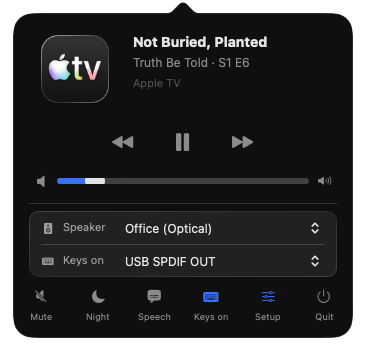
Screenshots you take yourself are welcome, with no permission needed. If you want a particular state captured — the trial notice, the setup walkthrough, the overlay mid-ramp — ask, and it will be sent as a file rather than described.
Review enquiries
Use the contact form. Questions about how something works, requests for an asset that is not here, and drafts you would like fact-checked are all welcome — we would much rather correct a sentence before it is published than after.
For background, the product page sets out the problem and the setup it is for, the changelog records what is in each release, and the terms of sale and privacy notice say exactly what is being sold and what is collected.
Trademarks
Sonos is a trademark of Sonos, Inc. Mac and macOS are trademarks of Apple Inc. Optically is an independent product and is not affiliated with, authorised by, or endorsed by either company.